To remove locked google bar:
Step 1: Turn Off the Locked Bottom Search BarLong:
a. Press any empty space on your home screen.
b. Tap Settings (or Home screen settings) in the bottom right corner.
Eg:
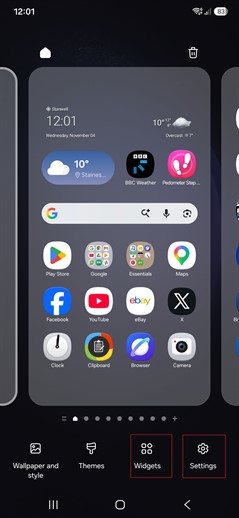
c. Scroll down and look for Show search on Home screen and select it.
d. Toggle this setting Off. The locked bottom bar will disappear immediately.
Step 2: Add a Movable Google Bar to the Top:
a. Long-press an empty space on your home screen again.
b. Tap Widgets. Scroll down and select Google.
c. Touch and hold the Search bar widget, then drag it to your home screen.
d. Release it near the top of your page.
You can now resize it or move it around whenever you want.
Bootmenu:
To open bootup menu at start up: hold volume up and press power button to start mobile device.
Screenshot:
To take a screen shot: hold down volume down, and hold power button for 1 second.
Multitasking:
To open multi-tasking list: hold home button for 1 second
To kill a task: bring up multi-task list and swipe item you want to kill.
